Measure First, Fix Fast: Shopify Search Speed and Relevance
Measure Shopify search speed and relevance this week, fix typos, synonyms, and merchandising, then validate results with Indexa's free audit.

Measure First, Fix Fast: Shopify Search Speed and Relevance
Shopify search speed is really two problems wearing one name: how fast the query returns and how relevant those results actually are. Both matter and default Shopify search struggles with the second one far more than the first. The right move is to measure both this week, run the free configuration fixes (typo tolerance, synonyms, merchandising), and only consider a managed AI upgrade like Indexa if zero-result and relevance numbers stay bad after that.
TL;DR:
- Most search failures stem from typos, phrasing mismatches, and poor result ranking, which can be fixed with configuration adjustments before considering an AI upgrade.
- Key metrics like zero-result rate under 5%, low latency, and high relevance scores should be tracked and improved iteratively.
- Manual fixes such as typo tolerance, synonyms, redirects, and result merchandising can significantly boost relevance without infrastructure changes.
- An AI-powered search solution becomes necessary when zero-result rates remain high despite configuration efforts, especially for large, multilingual, or fast-growing catalogs.
- Upgrading involves measuring baseline performance first, then testing in parallel, and planning for ongoing relevance tuning post-migration.
Table of Contents
- Why Search Speed and Relevance Actually Drive Revenue
- How to Measure Your Shopify Search Performance This Week
- High-Impact Configuration and Merchandising Fixes You Can Deploy Now
- When Configuration Isn’t Enough: Deciding on a Managed AI Upgrade
- A Step-by-Step Troubleshooting Guide for Common Search Slowdowns
- Technical Optimization: Caching and Indexing Strategies That Help
- How Third-Party Apps and Themes Affect Search Performance
- Managed Shopify Search Solutions: Pros, Cons, and What They Cost
- Migrating From Default Search to an Upgraded System
- What I’d Prioritize First (and Who Should Own It)
- Get a Free Shopify Search Audit From Indexa
- Sources
- FAQ
Why Search Speed and Relevance Actually Drive Revenue
Search users are not casual browsers. They know what they want, and they convert far more often than people who click through categories. Industry data on on-site search behavior show searchers make up a significant minority of site visitors but generate a disproportionately large share of revenue, converting at roughly two to three times the rate of non-searchers. When that search box fails, you are not losing a browser. You are losing your highest-intent buyer.
Quick stat: Best-practice targets put zero-result rates under 5%, though many stores run at 10 to 15% without realizing it, according to Digital Applied’s 2026 conversion playbook.
Latency and relevance are not the same metric, and treating them as one is where a lot of merchants go wrong. A search box can return a result in 40 milliseconds and still be broken if the results are wrong. Speed is plumbing. Relevance is whether the plumbing carries the right water.
That distinction shows up in a few practical benchmarks worth tracking side by side:
- p95 query latency: the response time for the slowest 5% of searches, not the average. Vendor targets often aim for response times under a tenth of a second.
- Zero-result rate: the share of searches returning nothing, ideally under 5%.
- Exit-after-search rate: how many shoppers leave the site right after searching, a strong proxy for relevance failure.
- Uptime and error rate: basic infrastructure health, necessary but not sufficient on its own.
Fast and wrong is still wrong.
How to Measure Your Shopify Search Performance This Week
You do not need a data team to know whether your search is underperforming. You need 90 days of query logs and an afternoon.
- Export your search query data. Pull 30 to 90 days of onsite search terms from your analytics or search app, including query text, result count, and whether the shopper clicked a result.
- Score your top 200 queries. Rate each on a simple 0/1/2 scale: 0 means no relevant result appeared, 1 means a partial or loosely related match, 2 means the top results nailed the intent. This graded-judgment approach mirrors what TensorOpt recommends for building a relevance baseline like NDCG@10, rather than assuming speed equals quality.
- Calculate your zero-result rate. Divide queries returning nothing by total queries.
- Calculate exit-after-search rate. Cross-reference search sessions against site exits within the same session.
- Check p95 latency. Most Shopify apps or your theme’s dev tools can log response times; sort and find the 95th percentile, not the average.
- Flag the pattern. If failures cluster around misspellings and multi-word phrasing, that is a configuration problem. If failures span exact-match queries too, or if latency spikes under load, that is closer to a platform limit.
A simple tracking sheet makes the pattern easy to spot:
If latency stays fast across every row but relevance collapses on misspellings and synonyms, that is not a speed problem. That is a matching problem, and it is fixable without touching your infrastructure.
High-Impact Configuration and Merchandising Fixes You Can Deploy Now
Most search failures are not exotic. They are typos, phrasing mismatches, and a results grid that shows the wrong things first. Fix these before you touch anything structural.
- Turn on typo tolerance and fuzzy matching. Shopify’s native search ranks by keyword frequency, field importance, and field length, and it excludes stopwords, according to Shopify’s own documentation. It was not built to guess what “sweeter” means when a shopper typed “sweatr.”
- Enable autocomplete and query suggestions. This catches errors before the shopper hits enter and nudges them toward a query your catalog can actually answer.
- Build synonym lists for your top failing queries. If shoppers search “sneakers” and your product titles all say “trainers,” that mismatch costs you sales every day until someone maps it.
- Merchandise the results grid. Boost in-stock, high-margin, and highly rated products to the top. Forbes coverage of ecommerce search attractiveness points out that visuals, price display, and availability meaningfully shift click-through rates independent of raw relevance.
- Set redirects for your most common failed queries. If “gift card” always returns zero results because your product is titled “e-gift certificate,” redirect it.
- Design a zero-result recovery page. Show category links, popular searches, or a curated collection instead of a blank page. A dead end is a lost sale; a suggestion is a second chance.
- Denormalize key fields at index time. Price, inventory status, and variant attributes should be available to the ranking logic directly, not fetched separately, so relevant-and-available products surface first.
Pro Tip: Run your synonym list against last month’s zero-result queries before you write a single mapping. Guessing at synonyms wastes time; your own failed searches already told you what shoppers call your products.
Shopify’s Search & Discovery app helps with filtering and manual synonym entry, but it still leans on you to catch every misspelling and translation by hand, per Shopify’s documented ranking behavior. That manual burden is exactly where configuration stops scaling.
When Configuration Isn’t Enough: Deciding on a Managed AI Upgrade
Configuration fixes handle a large share of failures, but they hit a ceiling. A few signals tell you when you have reached it:
- Persistent zero-results after fixes. If you have added synonyms and typo tolerance and the rate is still high, the gap is architectural, not administrative.
- Catalog size and turnover. Stores with thousands of SKUs and frequent new arrivals cannot maintain synonym lists by hand indefinitely.
- Multilingual traffic. Manual synonym mapping does not scale across languages; multi-store testing found default Shopify search failed 91% of multilingual queries, a gap AI-powered search closed in the same test.
- Search-driven revenue share above roughly 15%. The more revenue tied to search, the more a small relevance gain is worth in dollar terms.
- Limited team bandwidth. If nobody owns weekly synonym updates, they will not happen consistently.
What a managed AI search service adds beyond configuration is semantic matching (understanding “waterproof jacket” and “rain coat” mean the same thing without a manual synonym entry), continuous tuning based on real shopper behavior, and a no-code merchandising console so marketing can adjust boosts without a developer.
Before choosing a vendor, get three numbers in hand: your current relevance baseline, your zero-result rate, and a realistic expectation for uplift testing after go-live. Any credible managed provider should be comfortable measuring against those, not just promising a faster search box.
A Step-by-Step Troubleshooting Guide for Common Search Slowdowns
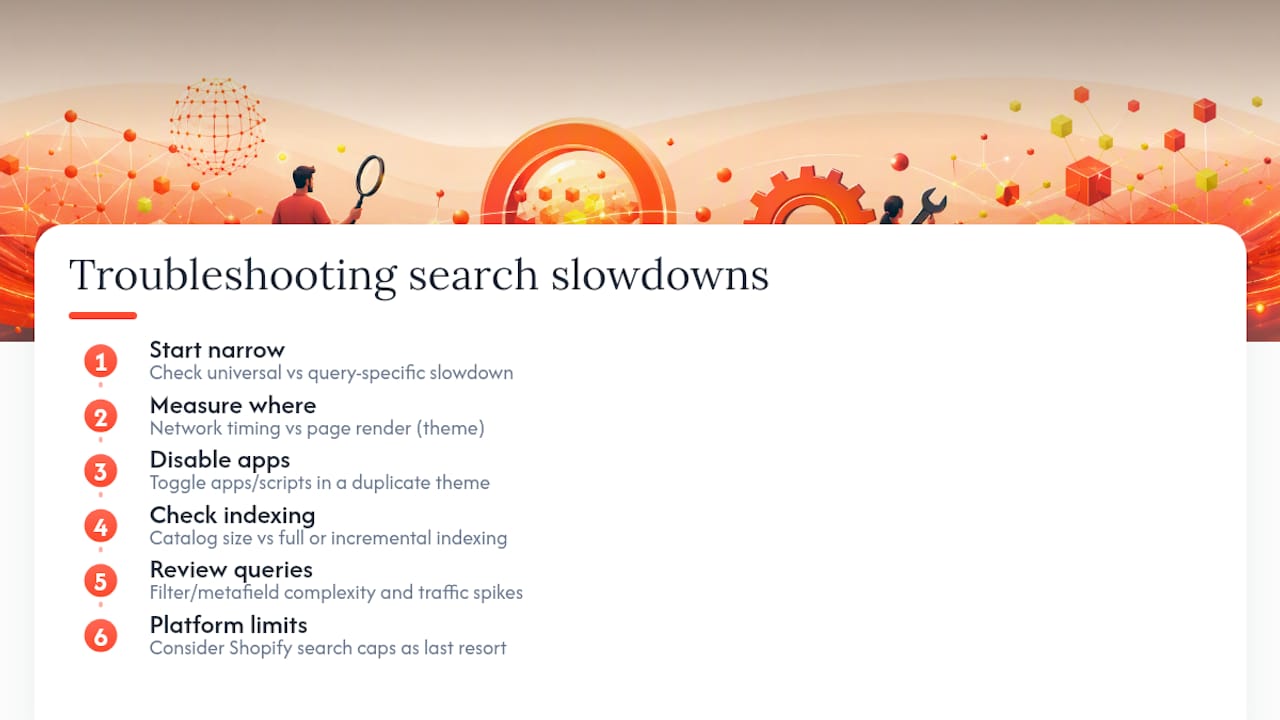
Start narrow and work outward. First, check whether the slowdown is universal or query-specific. If only certain searches lag, the issue is usually indexing depth or filter complexity on those terms, not global infrastructure.
Second, isolate whether the delay happens on the storefront or in the backend response. Browser dev tools will show you the actual network timing for the search request; if the request itself returns fast but the page renders slowly, your theme is the bottleneck, not the search engine.
Third, test with apps and third-party scripts disabled, one at a time, in a duplicate theme. A slowdown that disappears when you toggle off a specific app has found its cause.
Fourth, check catalog size against your search tool’s indexing method. Full reindexing on every product change scales poorly past a few thousand SKUs; incremental indexing handles updates without rebuilding the whole catalog each time.
Fifth, review your query complexity. Searches that filter across many variant options or metafields simultaneously take longer to compute than a simple keyword match, and that cost compounds during traffic spikes.
If none of these isolate the problem, the most likely explanation is a platform ceiling. Shopify’s own documentation notes limits like a limit on prefix search results capped at a certain maximum number of matches, per Shopify’s search behavior guide, which shows up as missing results on common prefixes rather than as a slow response.
Technical Optimization: Caching and Indexing Strategies That Help
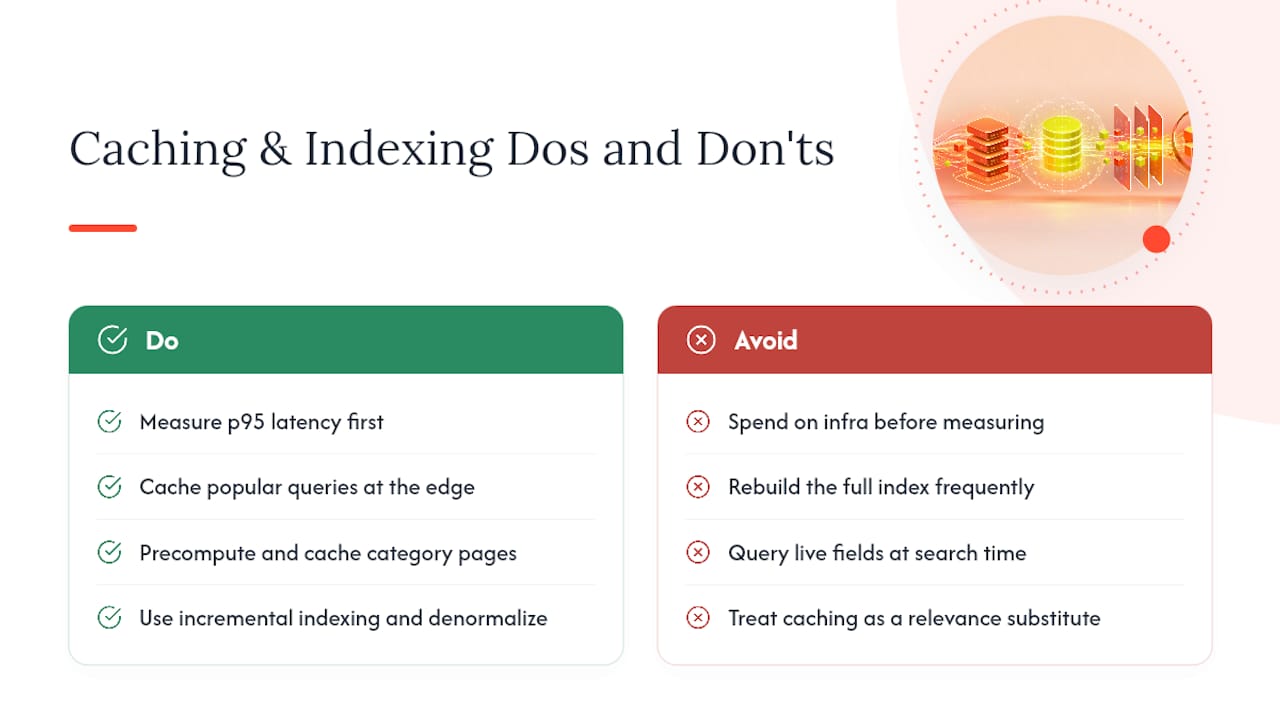
Caching and indexing are where a lot of merchants spend money without checking whether the problem was ever infrastructure. Before rebuilding anything, confirm your p95 latency numbers actually point to a platform bottleneck rather than a relevance gap.
If latency is genuinely the issue, a few strategies help. Cache popular queries at the edge so repeat searches for best sellers do not recompute results every time. Precompute and cache category and collection pages separately from the live search index, since those pages carry more filter complexity than a simple keyword box.
Indexing strategy matters more than raw server power for most Shopify stores. Incremental indexing, where only changed products update the index instead of a full rebuild, keeps larger catalogs responsive. Denormalizing fields like price, inventory count, and variant availability into the index itself, rather than querying them separately at search time, cuts the number of round trips a single search has to make.
Hybrid architectures that pair a fast lexical engine with a vector index for semantic recall are becoming the standard recommendation for stores with large or editorial-heavy catalogs, according to practitioner guidance on Shopify search architecture. That combination handles both exact matches and conceptual queries without forcing a tradeoff between the two.
None of this replaces the relevance work. A perfectly cached, perfectly indexed search that still returns the wrong products just fails fast instead of failing slow.
How Third-Party Apps and Themes Affect Search Performance
Every app you install adds a script, a database call, or both. Search-adjacent apps (filters, reviews, upsells, personalization widgets) are common offenders because they often hook into the same product data your search engine queries.
Diagnosing this is straightforward. Open your theme in a duplicate/test environment, disable apps one at a time, and re-run your latency test after each removal. A jump in response time when you re-enable a specific app tells you exactly where the weight is coming from. Pay close attention to apps that inject filter logic directly into search results pages, since those often run additional queries per filter combination rather than using a precomputed index.
Themes matter too, though usually in a different way. A heavy theme with unoptimized JavaScript can make search feel slow even when the actual query response is fast, because the results page takes longer to render once the data arrives. That is a front-end problem, not a search problem, and it is worth separating clearly when you report findings to a developer or vendor.
The practical rule: audit quarterly using Shopify SEO Automation, not just when something breaks. Apps update independently of your theme, and a change on the app side can quietly introduce a slowdown that never shows up in your own code review.
Managed Shopify Search Solutions: Pros, Cons, and What They Cost
Managed search platforms generally fall into two categories: search-and-merchandising tools that add filtering and manual synonym control on top of Shopify’s native engine, and fully managed AI services that replace the matching logic entirely with semantic and typo-tolerant search.
The first category tends to be less expensive and faster to set up, often through a standard app install. The tradeoff is that you still own the ongoing work: building synonym lists, tuning boosts, and manually addressing multilingual gaps. It suits smaller catalogs with a team member who has time to maintain it.
The second category, fully managed AI search, shifts that maintenance burden off your team. Pricing in this space is typically structured as a monthly subscription plus a one-time setup or onboarding fee, scaled to catalog size and traffic rather than a flat rate. The advantage is continuous relevance tuning without dedicated internal headcount; the tradeoff is a recurring cost that needs to be justified against the search-driven revenue share calculated earlier in your measurement work.
Neither approach is universally correct. A boutique store with 200 SKUs and low search volume may never need semantic matching. A multilingual catalog with thousands of SKUs and a rising zero-result rate almost certainly will, and that is the exact gap Indexa was built to close for Shopify merchants.
Migrating From Default Search to an Upgraded System
Switching search providers is not a full replatform, but it does require sequencing. Start with your baseline: the relevance scores, zero-result rate, and latency numbers you gathered earlier become the control group you compare against after go-live.
Next, confirm data access. A managed provider needs read access to your product catalog, including titles, descriptions, metafields, and inventory status, since those fields feed both relevance ranking and merchandising rules. Check whether your store uses a standard Shopify theme or a headless setup, including Shopify Hydrogen, since native storefront integration paths differ between the two.
Run the new search in parallel where possible, rather than a hard cutover. Testing the upgraded engine against a subset of live traffic, or in a staging environment against your scored query set, lets you confirm relevance actually improved before every shopper depends on it.
Finally, plan for a short tuning window after launch. Real query data reveals edge cases no pre-launch test catches, and a managed service should continue adjusting synonym and ranking behavior based on live shopper behavior rather than treating go-live as the finish line. Migration done this way takes days, not months, and the biggest risk is skipping the baseline measurement step, not the technical switch itself.
What I’d Prioritize First (and Who Should Own It)
Measure before you spend. Cheap fixes, typo tolerance, synonyms, merchandising, resolve more failures than most merchants expect, and merchandising alone often moves conversion more than shaving milliseconds off latency ever will. Assign one person to own search relevance and review zero-results weekly. Without an owner, even good fixes decay within a quarter.
— Barikreativa
Get a Free Shopify Search Audit From Indexa
Indexa is the managed upgrade for merchants who ran the diagnostic above and found the gap is bigger than a synonym list can fix. It is fully managed AI search built specifically for Shopify: typo tolerance, semantic matching that understands what shoppers mean instead of just what they typed, multilingual query handling, and a no-code merchandising console your marketing team can run without a developer. The service activates quickly without requiring setup work on your end.

Start with the free Shopify search audit, which measures your current zero-result rate, relevance scores, and latency against the benchmarks covered above. If the audit confirms configuration alone will not close the gap, Indexa’s managed AI upgrade continues tuning relevance based on your store’s real query data, not a one-time setup. Explore the full feature set or request your audit today to see exactly where your current search is losing sales.
Sources
- Search behavior — Shopify Help Center
- Your E-commerce Search Is Fast. That Says Nothing About Whether It Works. | TensorOpt
- Beyond Relevance: The Value Of Attractiveness In Ecommerce Search | Forbes
- On-Site Search & Merchandising: 2026 Conversion Play | Digital Applied
FAQ
Why Is Shopify Search Slow or Inaccurate by Default?
Shopify’s native search ranks by keyword frequency, field importance, and length while excluding stopwords, which handles exact matches well but struggles with typos, synonyms, and non-English queries without manual configuration, according to Shopify’s documentation.
What Is a Good Zero-Result Rate for Shopify Search?
Recommended zero-result rate targets are to keep them under 5%, though many stores have higher rates without regular tracking, based on industry benchmarks.
How Do I Increase Search Speed on Shopify Without Buying New Software?
Enable typo tolerance and autocomplete, build synonym lists from your actual failed queries, and merchandise results to surface in-stock and high-margin products first. These configuration fixes resolve most non-exact-query failures before any platform change is needed.
Should I Upgrade to an AI-Driven Search Solution?
Managed AI services like Indexa add semantic matching and continuous tuning that manual synonym lists cannot scale to match.
How Much Does a Managed Shopify Search Upgrade Cost?
Pricing for managed AI search typically runs as a monthly subscription plus a one-time setup fee, scaled to catalog size. Current Indexa pricing is available directly on Indexa’s site.
Recommended
Make discovery work harder.
See what your Shopify search could do better with a free, hands-on audit.
Get your free search audit