Shopify Merchants: Fix Top 20 Search Failures with Semantic Search
Understand how Shopify's semantic search works, its plan and locale limits, and three fixes you can make now: synonyms, product data, and merchandising.

Shopify Merchants: Fix Top 20 Search Failures with Semantic Search
Shopify semantic search uses AI to interpret natural-language queries and return relevant storefront results, even when shoppers don’t type the exact product name. Merchants control it inside the Search & Discovery app, but eligibility depends on your plan, and it comes with real limits on locale and predictive search that catch a lot of store owners off guard.
TL;DR:
- Semantic search reduces zero-result queries and improves access to niche products by expanding matches through intent, synonyms, and image data.
- Its effectiveness heavily depends on the quality and completeness of product metadata, descriptions, and alt text.
- It is only available on Shopify and Advanced plans, with limits related to product count and localization, and does not support predictive search.
- Manual tuning through synonym groups, product data updates, and merchandising controls can significantly enhance search relevance for smaller catalogs.
- Merchants with large, international, or rapidly changing inventories may require managed AI search services for continuous relevance improvements.
Table of Contents
- What Is Semantic Search on Shopify (And How Is It Different From Keyword Search)?
- How Much Does This Actually Move the Needle for Shopify Stores?
- How Shopify’s Semantic Search Actually Works Under the Hood
- Which Shopify Plans Support Semantic Search, and What Are the Limits?
- How to Tune Shopify Search Yourself: Synonyms, Data, and Merchandising
- Why Is My Shopify Search Still Returning Bad Results? Troubleshooting Common Issues
- When Do Built-In Controls Stop Being Enough?
- Get a Free Shopify Search Audit From Indexa
- Where to Read More From Shopify Directly
- Sources
- FAQ
- A Publisher’s Take on When to Upgrade Search
What Is Semantic Search on Shopify (And How Is It Different From Keyword Search)?
Keyword search matches literal words. Type “running shoes” with a typo, or search “cozy fall sweater” when your product is tagged “cardigan,” and a keyword engine comes up empty. Semantic search reads intent instead of just letters, using natural language processing to connect a query to the concepts behind it rather than the exact string typed.
Shopify’s own explainer describes this as factoring in intent, synonyms, related concepts, and image data rather than relying on literal word matches. That distinction shows up constantly in real store searches:
- A shopper types “gift for my mom” and gets scarves, jewelry, and candles, not a zero-result page.
- Someone searches “slings” and semantic matching connects it to “belt bag” listings.
- A conversational query like “something to wear in the summer” pulls back sundresses and linen shirts, showing relevant results rather than none.
That third example matters more than it seems. Shopify highlights conversational queries as a core use case, which means your search bar increasingly has to behave like a person answering a question, not a filter matching text.
How Much Does This Actually Move the Needle for Shopify Stores?
Zero-result searches are silent revenue leaks. A shopper who searches and gets nothing rarely tries a second query. They bounce. Semantic search directly attacks that problem by widening the match criteria for long-tail queries, the oddly phrased, specific searches that don’t map cleanly to a product title.
The practical benefits merchants tend to notice:
- Fewer “no results found” pages, especially on longer or misspelled queries.
- Better surfacing of niche or long-tail inventory that keyword search buried.
- Higher on-site search engagement, since shoppers who find something are more likely to click through and buy.
Pro Tip: Track your zero-result search rate before and after enabling semantic search. It’s one of the few search metrics that maps almost directly to lost revenue, and it’s easy to pull from your Search & Discovery analytics.
Search bounce (leaving right after a failed search) is the metric most worth watching, since it’s the clearest signal that your catalog has products a shopper wanted, but your search engine couldn’t connect the dots.
How Shopify’s Semantic Search Actually Works Under the Hood
You don’t need a machine learning background to use this feature, but knowing roughly how it works explains why your product data quality changes your results.
- Query interpretation. Shopify’s system uses NLP models to parse what a shopper is actually asking for, not just the words they used, translating the query into a representation of meaning called an embedding.
- Expansion and matching. From there, the engine expands the search using synonyms, related concepts, and product metadata. It cross-references product attributes, descriptions, and even image data, including text and colors detected in photos, to connect a query to relevant listings.
- Ranking and scoring. Matched products get scored on relevance signals, including how complete and specific your product metadata is, before Shopify decides what to show first.
Shopify’s engineering team has described the backbone of this at scale: a global product catalog run through multimodal large language models that generate embeddings and canonicalized metadata across millions of listings. The technical recap makes one thing clear for merchants: the model is only as good as the underlying data. A product with a thin title, no description, and no alt text gives the algorithm almost nothing to work with, no matter how sophisticated the ranking layer is.
Which Shopify Plans Support Semantic Search, and What Are the Limits?
Availability has changed over time, and it’s worth checking your plan before assuming the feature is live.
- Shopify expanded semantic search to more plans in June 2024, extending it to merchants on the Shopify and Advanced plans through the Search & Discovery app.
- Semantic capability does not apply to predictive search, the autocomplete dropdown that appears as a shopper types. It’s limited to full search results pages.
- Shopify’s Help Center documentation notes product count thresholds and other eligibility requirements merchants should confirm before assuming the feature is active.
- Language and locale support has gaps. Multilingual stores, particularly those outside major English-speaking markets, sometimes see weaker semantic matching until Shopify’s models catch up.
If your store sits below the plan tier or product count threshold, you’re working with standard keyword matching, synonym groups included, until you either grow into eligibility or look at a managed alternative.
How to Tune Shopify Search Yourself: Synonyms, Data, and Merchandising
Most of the control merchants actually have lives in three places: synonym groups, product data, and manual merchandising.
- Build synonym groups. Inside Search & Discovery, you can map different terms as exact matches, so a search for “slings” also pulls “belt bag” listings. Use phrase synonyms for multi-word terms shoppers commonly substitute, like “sneakers” and “trainers.”
- Fix your product data. Go through your catalog and fill in missing attributes, write fuller descriptions using the words shoppers actually search, and add descriptive alt text to images. Semantic matching reads all of it, so a bare-bones listing is invisible to half the system’s signals.
- Use merchandising controls. Pin specific products to the top of key search terms, curate result sets for your highest-traffic queries, and test changes on a handful of live searches before rolling them out storewide.
Pro Tip: Pull your top 20 searched terms from Search & Discovery analytics and manually check what each one returns. That’s usually where you find your worst mismatches, and fixing just those often improves conversion faster than a broad catalog cleanup.
A search audit checklist can speed this process up if you’d rather work from a structured list than start from scratch.
Why Is My Shopify Search Still Returning Bad Results? Troubleshooting Common Issues
Enabling semantic search doesn’t guarantee good results overnight. Merchants commonly report a handful of recurring problems.
- Irrelevant results. The engine over-matches on a loosely related concept, showing products that technically connect to the query but aren’t what the shopper wanted.
- Slow concept learning. New products or recently changed descriptions take time to fully integrate into the matching model.
- Unexpected synonym behavior. A synonym group created for one purpose accidentally widens results in an unintended direction.
To diagnose these, reproduce the exact query that failed, note which products showed up versus which should have, and check whether the missing product has thin metadata or no image alt text. Fixing sparse product data solves a surprising share of “irrelevant results” complaints. If problems persist after a genuine data cleanup, and especially if you’re running a large or international catalog, it may be time to look past Shopify’s default tools toward more continuous, managed tuning.
When Do Built-In Controls Stop Being Enough?
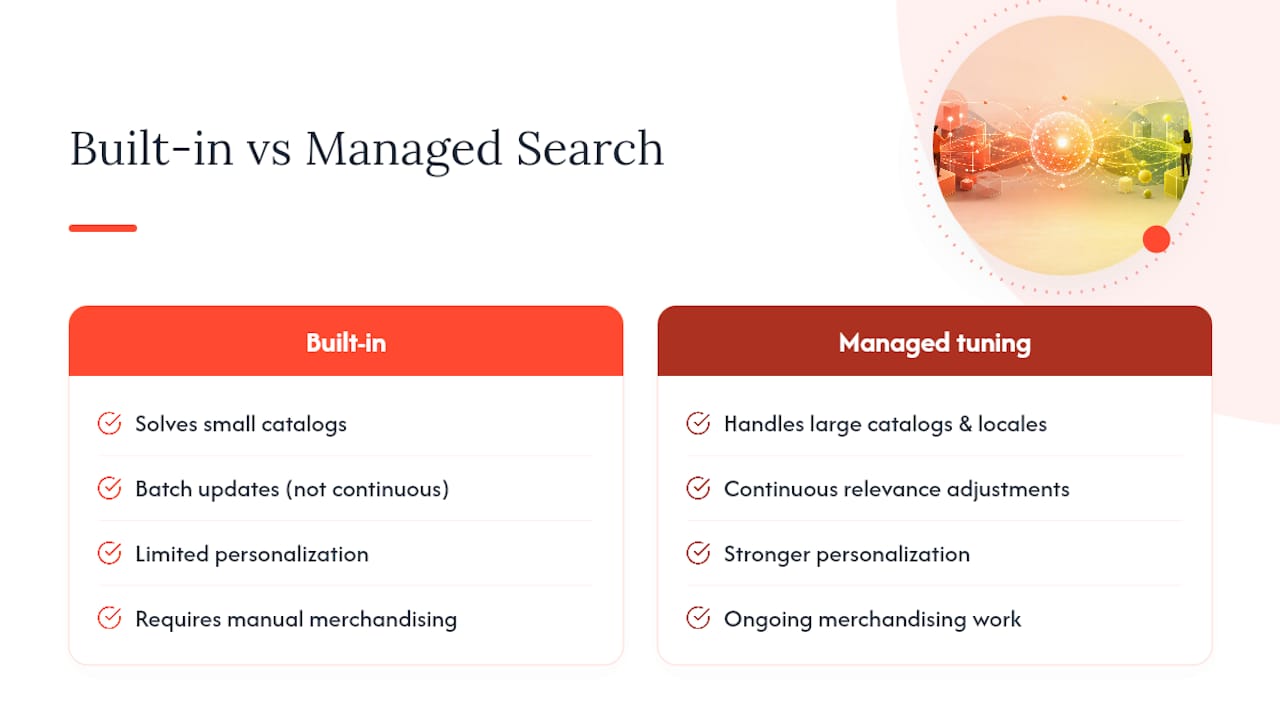
Synonym groups and metadata cleanup solve most small-catalog problems. But merchants running thousands of SKUs, multiple storefronts, or international locales often hit a ceiling: built-in tools update in batches, not continuously, and personalization is limited. Managed tuning trades a monthly cost for ongoing relevance adjustments and merchandising work you’d otherwise do by hand. It’s worth it when search failures are costing more in lost sales than the service costs. It’s not worth it for a 40-product store with clean data already performing well.
Get a Free Shopify Search Audit From Indexa
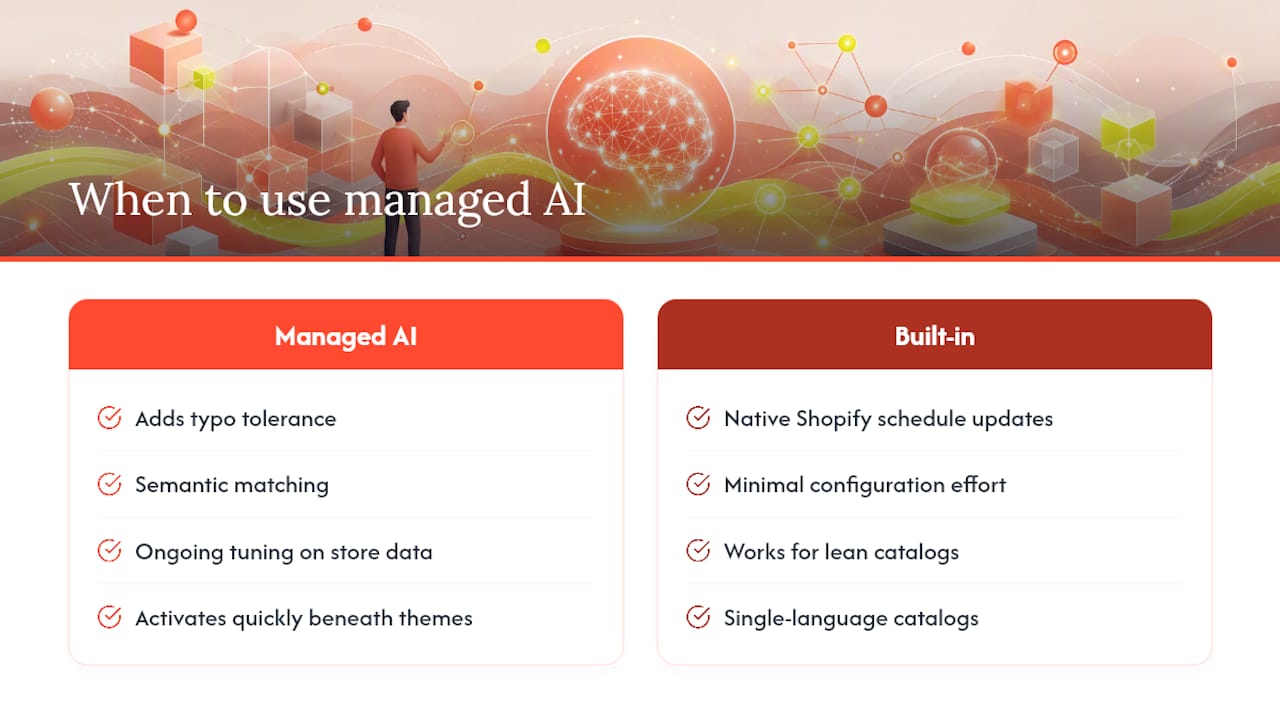
If you’ve cleaned up your metadata, built out synonym groups, and you’re still watching shoppers bounce off a bad search result, the gap usually isn’t effort. It’s that native tools update on Shopify’s schedule, not yours. There are fully managed AI search layers built specifically for Shopify stores that add typo tolerance and semantic matching with ongoing tuning against actual store data, requiring minimal setup from merchants.

Such services typically activate quickly and operate beneath existing storefront themes, including Hydrogen storefronts. These services are often suited for merchants with complex or fast-changing catalogs, multiple storefronts, or international shoppers where language gaps can impact native semantic matching. If you’re running a lean, single-language catalog under a few hundred SKUs, the built-in tools covered above may already do the job.
The fastest way to know which camp you’re in is to run a free Shopify search audit. It flags exactly where your current search setup is losing shoppers, whether that’s zero-result queries, mismatched synonyms, or thin product data, before you commit to anything.
Where to Read More From Shopify Directly
For the primary sources behind this guide: Shopify’s semantic search explainer covers the concept, the Help Center’s Search & Discovery documentation walks through merchant actions, the June 2024 changelog entry confirms plan availability, and the engineering recap covers the technical architecture for readers who want the deeper mechanics.
Sources
- Modify search with Search & Discovery - Shopify Help Center
- Semantic Search is now available on more plans - Shopify Changelog
- Leveraging multimodal LLMs for Shopify’s global catalogue - Shopify Engineering
FAQ
What Is the Best SEO Tool for Shopify Search Optimization?
There’s no single best tool, since Shopify search optimization spans keyword research, product metadata cleanup, and query analysis. For search relevance specifically, Shopify’s native Search & Discovery app handles synonyms and merchandising, while a conversational search audit can help you evaluate how well your store handles voice and natural-language queries.
How Do I Use Semantic Search Once It’s Enabled?
Once eligible, semantic search runs automatically on full search results pages. Your main job is tuning it: build synonym groups for terms shoppers substitute, fill in complete product data, and test your top search terms regularly to catch mismatches.
Is Shopify Still Worth It in 2026?
Shopify remains a strong platform choice for most merchants because of its ecosystem, app support, and ongoing investment in features like AI-driven search. Whether it’s “worth it” depends less on the platform and more on how well you use tools like Search & Discovery and, where needed, managed services layered on top.
What’s the Real Difference Between Keyword Search and Semantic Search?
Keyword search matches the literal words in a query against product text. Semantic search interprets the intent and context behind the query, connecting synonyms, related concepts, and even image data to return relevant products even when the exact words don’t match.
Does Semantic Search Work on Every Shopify Plan?
No. Semantic search is available on the Shopify and Advanced plans following Shopify’s June 2024 expansion, and it comes with product count thresholds and locale limitations that vary by store.
A Publisher’s Take on When to Upgrade Search
Shopify’s native semantic tools handle a genuinely large share of search problems for straightforward catalogs, and most merchants should exhaust synonym groups and metadata fixes before spending on anything else. Where that advice breaks down is scale: once you’re managing thousands of SKUs across multiple languages, manual tuning becomes a part-time job nobody signed up for. That’s the real case for a managed layer, not because native tools are broken, but because continuous tuning at scale is a different problem than a one-time cleanup.
— Barikreativa
Recommended
Make discovery work harder.
See what your Shopify search could do better with a free, hands-on audit.
Get your free search audit